The JSON Masking Authorizer enforces the Policies of your Policies Workspace on each JSON payload. How you model those Policies depends on the enforcement mode. Data Instructions mode uses two Asset Types, explicit Actions, and Allow and Deny row Policies. Resolution mode, the default, uses the Policy Resolution access and privileges sections.
This article covers Data Instructions mode first, then Resolution mode.
Data Instructions Mode
Supported Actions
Masking Policies assign Actions of the masking catalog Asset Type to properties. Each Action value tells the Authorizer what to do with the property: replace it with a text, set it to null, remove it, pass it through a masking function, or return it as is.
Action Value Format
An Action value has three parts separated by :::
OPERATION::value::priority
| Part | Meaning |
|---|---|
OPERATION |
REPLACE, FUNCTION, or VIEW. Not case-sensitive. |
value |
Depends on the operation: the replacement text, NULL, or REMOVE for REPLACE; the function call for FUNCTION; empty for VIEW. |
priority |
An integer. Use 0 unless you need to rank competing Actions. |
Note:
0is the highest priority. When several Actions compete for the same property, the lowest number takes priority.
Complete Actions List
These are all the Actions the Authorizer supports. Each Action is explained below.
| Action value | Effect on the property | "ABCDEFGHJK" becomes |
|---|---|---|
REPLACE::***::0 |
Replaced by the text, as a JSON string | "***" |
REPLACE::NULL::0 |
Set to null |
null |
REPLACE::REMOVE::0 |
Deleted from the object | No property |
VIEW::::0 |
Returned unchanged. Under deny by default, it grants the property. | "ABCDEFGHJK" |
FUNCTION::first(4)::0 |
Keeps the first n characters | "ABCD******" |
FUNCTION::middle(4)::0 |
Keeps the middle n characters | "***DEFG***" |
FUNCTION::last(4)::0 |
Keeps the last n characters | "******GHJK" |
FUNCTION::edges(4)::0 |
Keeps the first n and the last n characters | "ABCD**GHJK" |
FUNCTION::last4::0 |
Keeps the last 4 characters | "******GHJK" |
FUNCTION::mask_4::0 |
Keeps the last 4 characters (same as last4) |
"******GHJK" |
FUNCTION::md5::0 |
Replaced by its MD5 hex digest | "8ad40d08952f21b8e0e83812e90fcc38" |
A property with no Action is returned unchanged by default, and masked by its type under deny by default.
Effect by Value Type
The result is the same with leastPrivileges set to true or false.
| Action | String | Number | Boolean | null |
Object or array |
|---|---|---|---|---|---|
REPLACE::***::0 |
"***" |
"***" |
"***" |
"***" |
"***" |
REPLACE::NULL::0 |
null |
null |
null |
null |
null |
REPLACE::REMOVE::0 |
Removed | Removed | Removed | Removed | Removed |
VIEW::::0 |
Unchanged | Unchanged | Unchanged | Unchanged | Unchanged |
first, middle, last, edges |
Masked string | Masked number | null* |
null* |
null* |
last4, mask_4, md5 |
Masked string | null* |
null* |
null* |
null* |
* The function does not support this type: the property becomes null and the Authorizer logs one WARN line.
REPLACE
REPLACE::<text>::0writes the text in place of the value, for example***,N/A, or[redacted]. The result is always a JSON string, whatever the original type:REPLACE::0::0writes the string"0", not a number. On an object or array, the string replaces the whole container.REPLACE::NULL::0keeps the property and sets it tonull. Use it when clients expect the key to be present.REPLACE::REMOVE::0deletes the key and the value. Use it when clients must not learn that the property exists. REMOVE runs after every other Action, so the paths of all Actions refer to the object as it arrived.- An empty text (
REPLACE::::0) writesnulland logs a WARN line. UseREPLACE::NULL::0to setnullon purpose.
NULL and REMOVE are not case-sensitive. Any other text is written as is.
VIEW
VIEW::::0 returns the property unchanged. Leave the middle part empty.
- With
leastPrivileges: false, a property without an Action is already returned unchanged, so VIEW records in the Policy that the property is visible. - With
leastPrivileges: true, VIEW is how a Policy grants a property. - VIEW on an object or array (
address) returns the whole container. Actions on properties inside it (address.zip) still apply. - When VIEW and a masking Action reach the same property, the masking Action wins.
FUNCTION
FUNCTION::<function call>::0 passes the value through a masking function. The functions configuration key must list the function.
| Function call | Types | Keeps visible | String ABCDEFGHJK |
Number 1234567890 |
|---|---|---|---|---|
first(n[,c]) |
String, number | First n | "ABCD******" |
1234999999 |
middle(n[,c]) |
String, number | Middle n | "***DEFG***" |
9994567999 |
last(n[,c]) |
String, number | Last n | "******GHJK" |
9999997890 |
edges(n[,c]) |
String, number | First n and last n | "ABCD**GHJK" |
1234997890 |
last4 |
String | Last 4 | "******GHJK" |
|
mask_4 |
String | Last 4 | "******GHJK" |
|
md5 |
String | MD5 hex digest | "8ad40d08952f21b8e0e83812e90fcc38" |
nis a positive integer.cis an optional mask character. The default mask is*for strings and9for numbers:first(4,#)onABCDEFGHJKgives"ABCD######".- A number stays a number, so its mask character must be a digit.
- A value too short to mask stays unchanged:
first(4)on"ABC"gives"ABC". md5hashes the same input to the same digest, so you can still match or group a hashed property without revealing it.
The property becomes null, with one WARN line, when the function cannot run: the function is not listed in functions; the arguments are malformed or n is not positive; the function does not support the value's type; or a number result would not be a valid JSON number, such as last(4,0) on 1234567890.
Migrating Actions from Resolution Mode
Policies that run in Data Instructions mode need Actions in the new format.
| Resolution mode value | Data Instructions value | Notes |
|---|---|---|
MASK |
REPLACE::***::0 |
Resolution mode wrote maskString on strings and null on other types. REPLACE writes the text on every type. |
A custom text, such as --- |
REPLACE::---::0 |
|
REMOVE |
REPLACE::REMOVE::0 |
|
last4, mask_4, md5 |
FUNCTION::last4::0 |
Same for the other function names |
last(4), edges(4) |
FUNCTION::last(4)::0 |
|
1::MASK (priority first) |
REPLACE::***::1 (priority last) |
|
FILTER on a privileges Policy |
An Allow or Deny row Policy | See Row Rules below. |
| An Action that sets a value for a missing field | Not supported | A path that resolves to nothing is skipped, so the Authorizer does not create the property. |
Asset Types
Data Instructions mode uses two Asset Types. You choose their names and Action names.
Refer to Managing Asset Types for more information on what Asset Types are and how they work.
The Data Object Asset Type
Represents one record of the payload, such as an account. It drives row rules and conditional masking.
| Setting | Value |
|---|---|
| Asset Type ID | Any name. The PDP answers with an entry whose fullyQualifiedPath is this ID, and the request selects it with environment.resourceFullPath[0]. |
| Where are your Assets? | Request |
| Asset Type is used for data filtering? | Yes |
| Attributes | The record properties that rules test, String or Numeric, available for Policies. Name each Attribute exactly as the property in the JSON object. |
| Actions | One Action that every Policy on the data object uses, for example ACCESS. It is not a masking Action. |
The Masking Catalog Asset Type
Represents the properties of the record. Its Actions are the masking Actions.
| Setting | Value |
|---|---|
| Asset Type ID | The value of the assetType configuration key. |
| Where are your Assets? | Platform. You create the Assets in the Platform. |
| Asset Type is used for data filtering? | No |
| Attributes | One String Attribute that repeats the property path (for example fields), so Rulesets can select Assets by path. |
| Assets | One Asset per property. The Asset ID is the property path, relative to the data object. With dataPropertyKey: "path", the PDP takes the path from the Asset ID. |
| Actions | One Action per masking instruction, with a value in OPERATION::value::priority format. |
Rulesets
- Data object Rulesets test the Attributes of the data object, for example
country = US. The predefined All Ruleset matches every object. - Catalog Rulesets select properties, usually by the path Attribute:
fields = balance, orINfor several. A Policy can also select catalog Assets directly.
Policies
| Policy | Contains | Becomes in the PDP answer |
|---|---|---|
| Allow row Policy | Access type Allow. A data object Ruleset with the data object Action. | Part of the allow tree in dataObjectInstructions |
| Deny row Policy | Access type Deny, shown as Restrict in the Platform. A data object Ruleset with the data object Action. | Part of the deny tree in dataObjectInstructions |
| Masking Policy | Access type Allow. A data object Ruleset (or All) with the data object Action, plus catalog Rulesets or Assets with masking Actions, one block per Action. | Entries in dataEnforcementInstructions: properties from the catalog Assets, operation, value, and priority from the Action, and the condition from the data object Ruleset |
Note: A Policy with only a data object Ruleset filters rows. A Policy with a data object Ruleset plus catalog Assets masks properties. The Authorizer does not use a Policy with only catalog Assets: always pair the catalog with the data object, and use All for unconditional masking.
How Masking Instructions Are Applied
Each instruction carries the properties it applies to, the operation and value of the Action, its priority, and a condition:
{"properties": ["cardNumber"], "operation": "FUNCTION", "value": "last4", "priority": 0,
 "condition": {"OR": [{"OR": [{"AND": [{"attribute": "country", "type": "STRING",
   "operator": "EQUALS", "values": ["US"], "match": "any"}]}]}]}}
Conditions
The instruction applies only to objects that match its condition. All becomes {"operator": "ALL"} and matches every object.
- Operators:
EQUALS,NOTEQUALS,GREATER,LESS,GREAT_EQUALS,LESS_EQUALS,STARTWITH,ENDWITH,IN,NOT_IN,CONTAINS - Types:
STRING,NUMERIC
The Authorizer resolves anything unexpected toward hiding data. A condition leaf with an unknown operator or type, or a NUMERIC value that is not a number, matches every object in a condition and in deny, and no object in allow, with one WARN line each.
Competing Instructions
- The PDP resolves competing Actions by priority before it answers: the lowest number takes the highest priority. At equal priority it prefers REPLACE, then FUNCTION, then VIEW.
- If more than one instruction still reaches the same property of the same object, the Authorizer applies the most protective one: an unconditional mask beats a conditional mask, and a conditional mask beats VIEW. Between equally protective instructions, the first one listed wins. The Authorizer logs one WARN line for each such property.
Design Policies so each property has one clear Action per condition.
Property Paths
- Paths are relative to one data object:
email,address.zip. #walks arrays:cases.#.emailapplies to the email of every case, also at several depths.- A path that resolves to nothing is skipped.
- For the full path syntax and its limits, see Integration Patterns.
Row Rules
dataObjectInstructions holds an allow tree (from Allow row Policies) and a deny tree (from Deny row Policies). The Authorizer tests each object of the target against them.
parameters.root names the part of the payload that holds the data objects. If the target is an array, each element is one object that the Authorizer can remove. If the target is a single object, the Authorizer masks it but never removes it.
leastPrivileges |
The Authorizer keeps an object when |
|---|---|
false |
It does not match deny. The Authorizer does not read the allow tree. |
true |
It matches allow and does not match deny. With no allow tree, it keeps no object. |
- A tree is absent when it is missing, empty (
{}), or has no leaf with an Attribute. The leaf{"operator": "ALL"}matches every object. - When deny matches a single-object target, the Authorizer masks the object as a whole: the instructions run first (so REMOVE and NULL apply), then every remaining property gets its type default and every container becomes
null. VIEW keeps nothing readable. - When the PDP answer has no entry (no Policy applies),
falsereturns the payload unchanged, andtrueturns an array target into[]and masks a single-object target by type.
Deny by Default
Set leastPrivileges: true to switch the Authorizer from hiding what a Policy hides to showing only what a Policy grants. Nothing reaches the client unless a Policy allows the object and grants or masks the property.
Objects
An object stays only when the allow rule matches it and the deny rule does not. A single-object target always stays; when deny matches it, the Authorizer masks it as a whole.
Properties of the Objects That Stay
| The property has | Result |
|---|---|
| No instruction | Its type default: string "***", number 0, boolean false; null stays null |
| A VIEW instruction | Its value, unchanged |
| Another instruction | That instruction (REPLACE, FUNCTION, REMOVE, NULL) |
Containers (Objects and Arrays Inside the Record)
- A container that holds a property with an instruction, at any depth, stays. The instructions inside it apply, and its other properties get the defaults by these same rules.
- A container that holds no property with an instruction becomes
null. An element of an array that stays keeps its shape, and its properties get the defaults. - A VIEW on the container keeps the whole container; instructions on properties inside it still apply.
- A container with its own REPLACE, NULL, or REMOVE follows that instruction. The data object itself never becomes
null.
Payload {"name": "x", "address": {"city": "TLV", "zip": "1"}} with leastPrivileges: true:
| Instructions | Result |
|---|---|
REPLACE *** on address.zip |
{"name":"***","address":{"city":"***","zip":"***"}} |
VIEW on address.city |
{"name":"***","address":{"city":"TLV","zip":"***"}} |
VIEW on address |
{"name":"***","address":{"city":"TLV","zip":"1"}} |
VIEW on address + REPLACE *** on address.zip |
{"name":"***","address":{"city":"TLV","zip":"***"}} |
Designing Policies for Deny by Default
- Give every object type an Allow row Policy. Without one, the Authorizer returns no object.
- Grant every property that users must read with a VIEW Action. Use the All Ruleset of the data object for unconditional access, or a Ruleset for conditional access.
- Grant a whole sub-object with VIEW on the container (
address), or parts of it with VIEW on its properties (address.city). - Use Deny (Restrict) row Policies for objects that must never be returned.
- Test both settings before you switch. The Data Instructions Guided Example shows the same requests with both settings.
Resolution Mode
Resolution mode is the default and keeps working unchanged. It requires Asset Type modeling for the data objects and for the classification of sensitive properties, and data Policies that reflect your business logic. For background, see Managing Asset Types, Data Access Authorization Pattern, Policy Resolution, and Working with assetContext.
Actions
The Authorizer runs predefined behaviors based on the Action returned in the PDP access and privileges sections.
Access
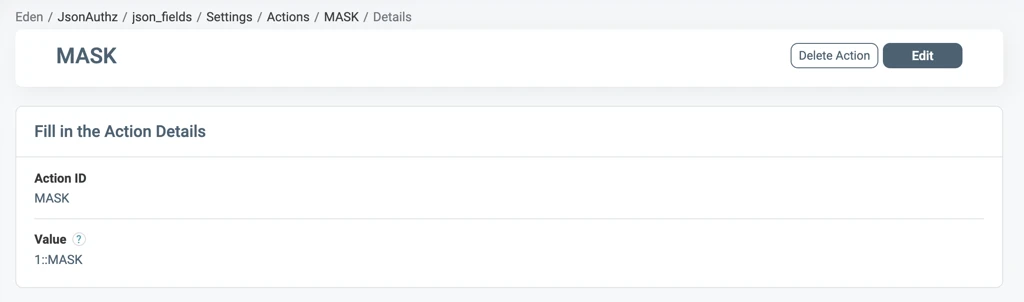
The access section defines the data properties (columns). The default Action is MASK, which masks the property by its data type and the maskString setting: strings become the mask string and other types become null. A custom Action value sets a specific mask, for example an Action CategoryMasking with the value --- masks the category property with ---.
Set a value for a field: To insert a value when a property is missing or empty, define a Ruleset for the target property, create an Action with any name, and give it the value to insert. At runtime the Authorizer creates the property if needed and writes the value.
Partial Masking Functions
Set one of these functions as the Action value to reveal part of a value: first(N), middle(N), last(N), or edges(N). N defaults to 4. Add a mask character after N, for example last(4, *). The results match the FUNCTION table in Data Instructions mode.
Action Priority
When several Actions match the same property, the lowest priority number runs first. Without a priority, the Authorizer applies the first Action in the resolution response, and that order is not guaranteed. Set the priority in the Action value:
priority::action_value
For example, 1::MASK takes precedence over 2::last4.
Privileges
The privileges section defines filtering rules.
- Conditional masking: For every Action except
FILTER, the privileges logic decides which objects the Authorizer masks. - Filtering: The
FILTERAction tells the Authorizer to keep only the objects that the privileges logic authorizes, whenfilteristrue.
Data Mappers
Data Mappers separate the logical Asset Types and Attributes used in Policies from their physical paths in the JSON of each service. Use them when the same property appears in different paths across services.
For example, to mask the Email Attribute of a Customer Accounts Asset Type in two services:
- Define two Mappers on the Asset Type:
AccountsandContracts. - On the
EmailAttribute, define the Attribute MapperaccountEmailforAccounts, andcustomerDetails.#.customerEmailforContracts.
When service 1 sends resourceFullPath: ["Accounts"], the response names the property accountEmail. When service 2 sends Contracts, it gets customerDetails.#.customerEmail. Paths are relative to the request root.
In Data Instructions mode with Data Mappers, resourceFullPath holds the mapper path, so send resourceTypes with the Asset Type names yourself. See Integration Patterns.