PlainID allows users to utilize integrations that enable automatic discovery and importing AI agents from external platforms into the AI Agent Registry. This provides centralized visibility across agent infrastructures without requiring manual registration.
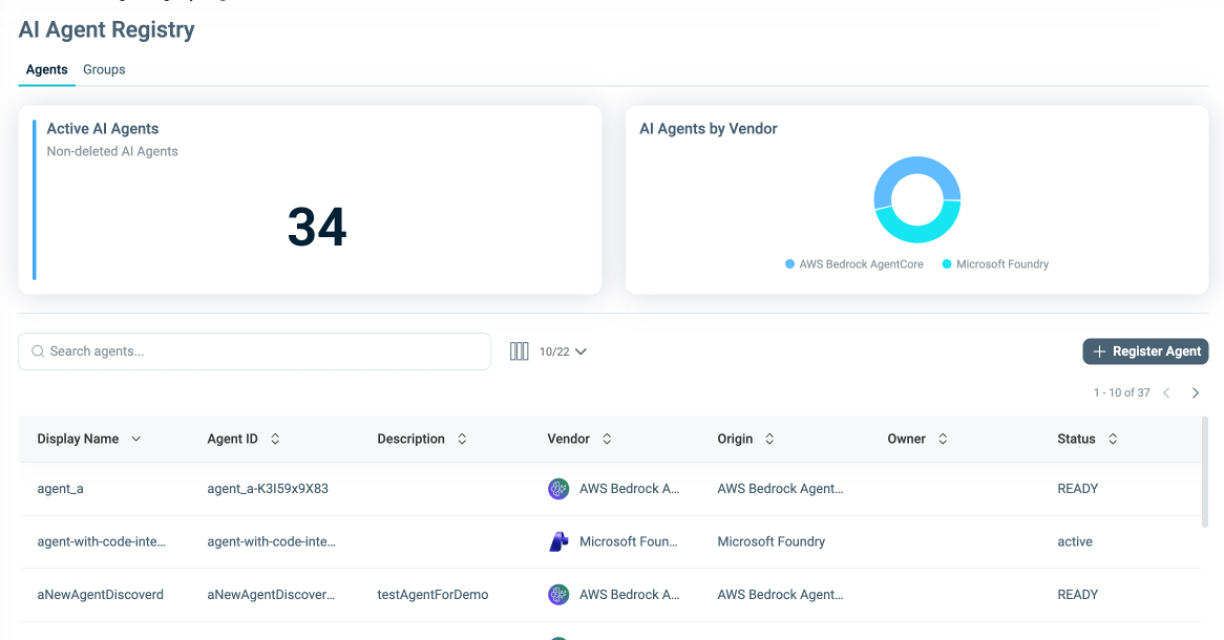
The PlainID Agent Registry is an inventory for agent information where users can govern their agents within the Platform. It supports agents discovered from any agent infrastructure during integration processes, as well as custom agents defined manually. Users can also create Agent Dynamic Groups. See Managing Agent Dynamic Groups for more information.
When an Integration Workspace connected to agents is created, agents are automatically discovered and added to the registry. Default and vendor-specific Attributes are populated, and the agent inventory is continuously enriched with metadata from the source system.
See Agent Discovery and Manual Registration to learn more about how to create or discover agents.
Enabling AI Agent Observability per Environment
In Tenants associated with multiple capabilities, AI Agent Observability must be explicitly enabled for each Environment where it is needed.
Tenants associated only with the AI Agent Observability capability do not need to perform this step. The full set of observability features is automatically enabled across all environments.
To enable AI Agent Observability for an environment:
- Navigate to Environment Settings. If the settings panel is collapsed, click the caret to expand it.
- Select the Details tab.
- Click Edit.
- Scroll down to AI Agent Observability Settings.
- Enable the Enable AI Agent Observability Features toggle.
- Confirm the action when prompted.
- Click Save.
Once enabled, AI Agent Observability cannot be disabled for that Environment.
Viewing Discovered Objects
In the Integration Workspace, you can browse all discovered objects and select an object to view detailed metadata.
In addition to discovering agents, objects used in the agentic workflow as tools and resources are also discovered.
existing Policies.