The Azure Entra ID Auth Store enables the PlainID Secrets Management Service to retrieve Microsoft Entra access tokens that can be used to authenticate to services that support Entra token-based authentication, such as Azure Managed Redis with Entra authentication enabled. By eliminating static credentials, this approach improves security and simplifies access management. This store is used when an application authenticates using Entra tokens instead of passwords or long-lived secrets.
To enable integration with Microsoft Entra ID, you must configure permissions and, optionally, define which identity the Secrets Management Service uses.
Required Microsoft Entra Prerequisites
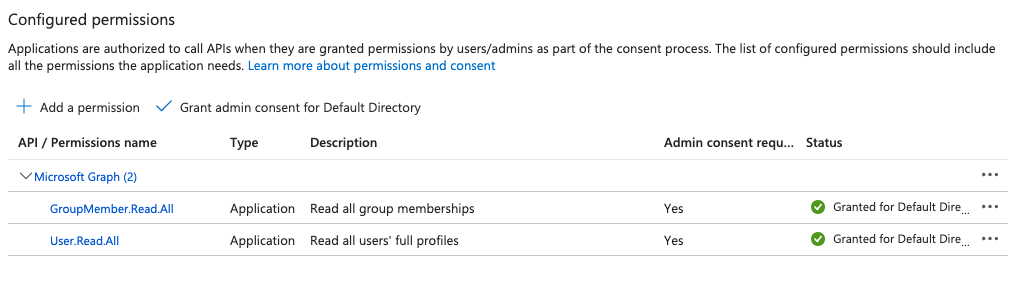
Ensure that the application registration in Microsoft Entra ID has the following Microsoft Graph API permissions:
GroupMember.Read.AllUser.Read.All
You can configure these permissions under API Permissions in the Azure portal.
For additional assistance, contact PlainID Support.
Identity Selection Behavior (System-Assigned vs. User-Assigned)
-
System-assigned managed identity
No client ID is required. -
User-assigned managed identity
If multiple user-assigned identities exist, Microsoft default behavior cannot infer which identity to use. In this case, you must explicitly specify the client ID by using the Environment VariableAZURE_ENTRA_ID_AUTH_CLIENT_ID.
Azure Entra ID Auth Store-Specific Parameters
The Azure Entra ID Auth Store is configured in the PlainID Secrets Management Service by using the store type AzureEntraIdAuth.
You must also authenticate to Entra ID by using one of the supported authentication methods:
- Client secret
- Certificate
Configure authentication by using the parameters described in the following table.
| Parameter | Description |
|---|---|
type |
Set the secret store type to AzureEntraIdAuth. |
details.auth |
Authentication configuration for Microsoft Entra ID using one of the supported methods. |
details.auth.tenantID |
The Entra tenant ID. You can use the Environment Variable ${AZURE_ENTRA_ID_AUTH_TENANT_ID}. |
details.auth.clientID |
The Entra application (client) ID. Use together with clientSecret or for user-assigned managed identity selection. Not used with certPath and keyPath. Required for application-based authentication and user-assigned managed identity selection. You can use the Environment Variable ${AZURE_ENTRA_ID_AUTH_CLIENT_ID}. |
details.auth.clientSecret |
Client secret for application-based authentication. Use together with clientID or for user-assigned managed identity selection. Not used with certPath and keyPath.You can use the Environment Variable ${AZURE_ENTRA_ID_AUTH_CLIENT_SECRET}. |
details.auth.certPath |
Path to the certificate file for certificate-based authentication. Use together with keyPath or for user-assigned managed identity selection. Not used with clientID and clientSecret. You can use the Environment Variable ${AZURE_ENTRA_ID_AUTH_CERT_PATH}. |
details.auth.keyPath |
Path to the private key file for certificate-based authentication. Use together with certPath or for user-assigned managed identity selection. Not used with clientID and clientSecret. You can use the Environment Variable ${AZURE_ENTRA_ID_AUTH_KEY_PATH}. |
Example
The following example shows a Secrets Management Service configuration that includes the Azure Entra ID Auth Store parameters:
secretsMgmt:
  ...
  plainIDConfig:
    ...
    # Secret Store configuration
    secretStore:
      - id: AZURE_ENTRA_ID_AUTH_STORE
        type: AzureEntraIdAuth
        isDefault: false
        details:
          auth:
            tenantID: ${AZURE_ENTRA_ID_AUTH_TENANT_ID}
            clientID: ${AZURE_ENTRA_ID_AUTH_CLIENT_ID}
            clientSecret: ${AZURE_ENTRA_ID_AUTH_CLIENT_SECRET}
            certPath: ${AZURE_ENTRA_ID_AUTH_CERT_PATH}
            keyPath: ${AZURE_ENTRA_ID_AUTH_KEY_PATH}
Secret Rotation Behavior (Token Refresh)
Unlike static Redis passwords, Microsoft Entra access tokens are short-lived. Secret rotation is implemented by refreshing the token before it expires.
To ensure uninterrupted Redis access:
- The Secrets Management Store should return a fresh Entra access token each time the secret is read.
- The client (as an example Redis client) should periodically reauthenticate by issuing an
AUTHcommand with the refreshed token.
Notes and Limitations
- TLS or SSL must be enabled when using Entra token-based authentication.
- Entra ID group-based authentication is not supported for Azure Managed Redis in this model.
- Failure to refresh the token before expiration can result in Redis connection interruptions.
Refer to Azure Managed Redis Authentication to see the use-case for the Microsoft Entra ID Authentication